Free resume checker: the whole thing, start to finish
Upload a PDF or DOCX, get a 0–100 score in under a minute, fix every flagged line for free, download the polished file for $9.99 if you want it. Here is every screen.
Most resume checkers give you a number and a paywall. Resume Aura gives you the number, the reason for the number, the specific lines that caused it, three rewrites for each of those lines, and as many re-scans as you want — all free, with no sign-up and no card. The only thing you ever pay for is the polished file at the end, and only if you want it.
This post is the whole loop, screen by screen, using the demo resume the app ships with: Alex Morgan, a product leader with a genuinely strong background whose resume scores 58. If you have never used the app, by the end of this you will know exactly what is about to happen.
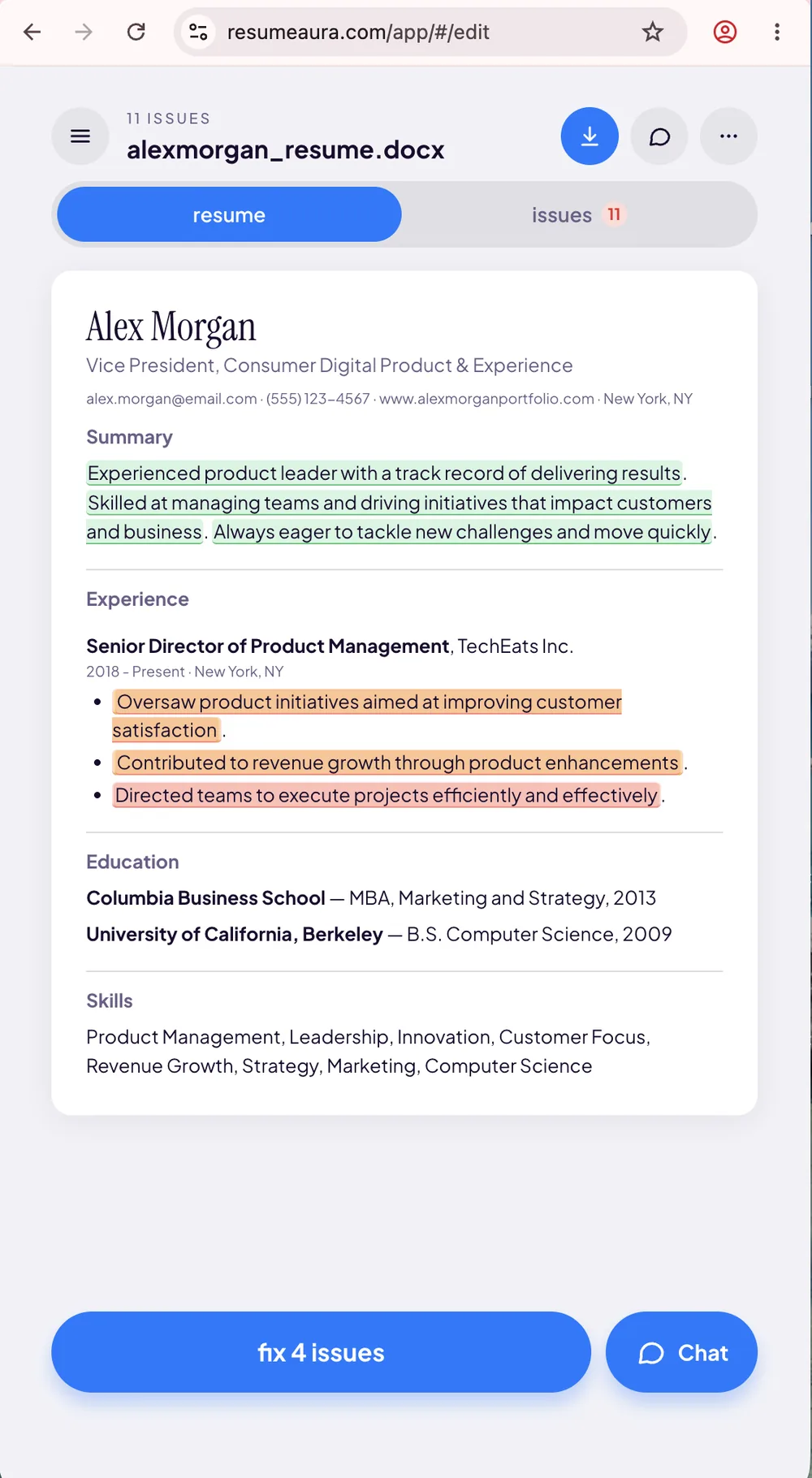
resumeaura.com/app/#/edit — every line graded in place. Open it with your own resume; it's free and there's no sign-up.Step 1 — Upload
Drag a PDF or DOCX, up to 10 MB, onto the dropzone on the homepage, or click to browse for it. That's the entire onboarding. No sign-up, no card, no email address, no "verify your account to see your results."
The important part is what happens to the file. It is read once to compute the score, and then discarded. It is never stored. The only thing that survives the scan is an anonymous integer — your score — plus a timestamp, which exists solely so the app can draw the distribution curve you're about to see. Your resume text, your filename and your IP are not kept. The full detail is in the privacy policy, and it is worth reading, because "upload your resume here" is a sentence that deserves scepticism.
Everything runs in the browser at resumeaura.com/app/ — nothing to install, and it works the same on a phone on the train as it does on a desktop.
Step 2 — The score
A few seconds later you land on the score screen. Four things are on it, and they answer four different questions.
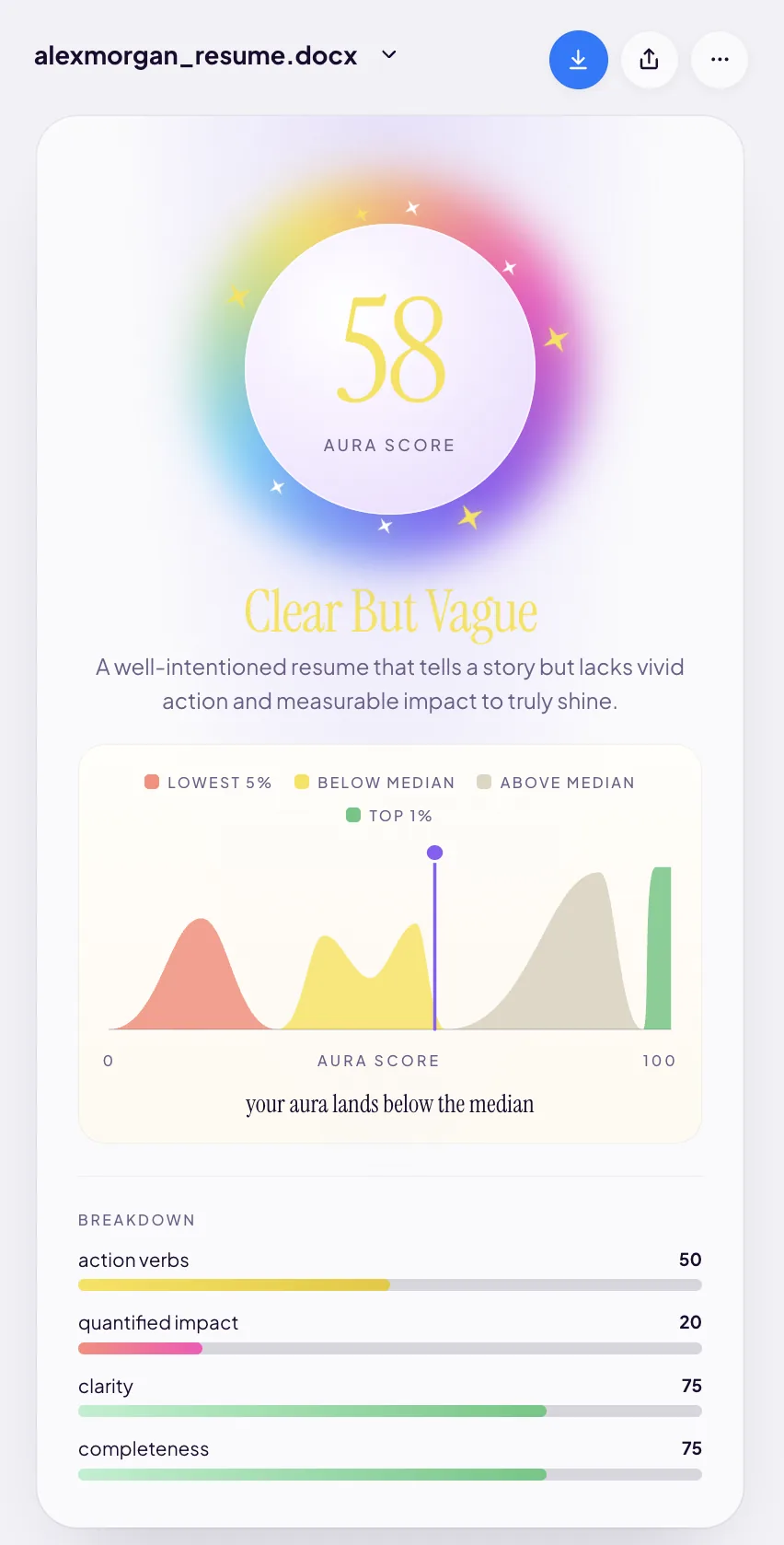
- The number — 58 out of 100. A weighted roll-up of everything below it. Not a pass/fail, and not a prediction about whether you'll get the job. It grades the document, not you.
- The band name — "Clear But Vague". The single most useful line on the screen, because it names the failure mode instead of just measuring it. Clear but vague means a recruiter can read your resume without effort and finish it without one hard fact worth repeating to a hiring manager.
- The curve. A distribution of every aura score ever computed, split into four bands — lowest 5% below median above median top 1% — with a marker showing where you land. Alex's caption reads, bluntly: "your aura lands below the median."
- The four breakdown bars. Action verbs 50, quantified impact 20, clarity 75, completeness 75.
Why the breakdown matters more than the headline: read as a set, those four bars tell a very specific story. Clarity and completeness are the plumbing — dates, sections, sentences you can follow — and they're fine. Action verbs and quantified impact are the persuasion, and they're failing. The resume is well-built and badly sold. That diagnosis is what turns a score into a to-do list. We take the whole screen apart in how to read your resume aura score.
Step 3 — See the issues
The score screen is a diagnosis. The next tap is the treatment. Switch to the resume view and your document comes back with every line graded in place: green highlights on the lines that are working, orange and red on the ones that aren't. Two tabs sit at the top — resume and issues 11.
This is the bit that separates a checker from a scorer. You are not handed a grade and told to go think about it. You are shown the eleven specific sentences responsible for it.
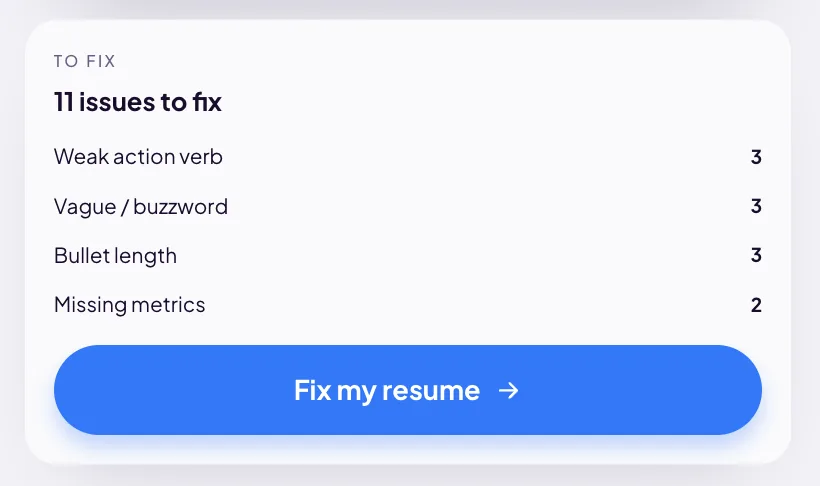
The issues card groups them so you can see the shape of the problem at a glance:
- Weak action verb 3 — bullets that open with a verb describing presence rather than achievement.
- Vague / buzzword 3 — language that sounds like work but asserts nothing.
- Bullet length 3 — lines carrying more than one idea, so a recruiter has to read them twice.
- Missing metrics 2 — claims with no number attached.
Notice how cleanly those map back onto the bars. The weak-verb and buzzword flags are what dragged action verbs down to 50. The missing-metrics flags are what dragged quantified impact down to 20. The breakdown told you what was weak; the issues list tells you which lines, so you never have to guess where to start. Each type has its own tell and its own fix — the four issue types, explained.
Step 4 — Fix them
There are two routes through the fixing, and you can mix them freely.
Route one: tap a flagged line
Tapping any highlighted line opens the rewrite sheet. It shows you what was flagged and why, then offers three AI-written alternatives, plus a "type a replacement" box if you'd rather write it yourself. Apply the one you like, or dismiss the whole thing — the app never overwrites a line without you saying so, because you are the only person who knows whether the number it just suggested is actually true.
Here is what that looks like on Alex Morgan's worst offender:
Oversaw product initiatives aimed at improving customer satisfaction
Led product initiatives that enhanced customer satisfaction scores by 15% through targeted feature development and user experience improvements at TechEats Inc.
Three things changed. Oversaw became Led — a one-word swap that turns supervision into ownership. "Aimed at improving" became "enhanced… by 15%" — an intention became a result with evidence behind it. And the vague noun phrase gained a mechanism: how it was enhanced, and where. Same work, same job, same person; a completely different document. The line-by-line reasoning is in how to fix a weak resume bullet.
Route two: just say what you want
Hit Chat and describe the change in plain English. "Fix my entire resume." "Make my summary more concise." "Add metrics to my TechEats bullets." It edits the resume for you and you keep or discard the result. This is the faster route when the problem is diffuse — when the whole summary is limp rather than one bullet being broken. More on it in chat with your resume.
There is also a "fix 4 issues" button that sweeps a batch of flags at once, for when you want momentum rather than craft.
All of this is free. The suggestions, the rewrites, the chat, the batch fixes — no card, no account, no per-fix credits. There is no version of this app where you get to the interesting part and hit a wall.
Try it on your own resume
PDF or DOCX, up to 10 MB. Score in under a minute. Your file is read once and discarded.
Check my resume free →Free score, free fixes. No sign-up.
Step 5 — Re-scan
Scan again. The number moves, the band can change, and the marker slides along the curve. This is the loop the whole product is built around — score, fix, re-score — and it is free and repeatable, on as many resumes as you like.
Re-scanning is not a vanity feature. It is the only honest way to know whether a rewrite actually helped, because your own judgement about your own resume is the least reliable instrument in the room. You have read the thing forty times. The scanner has not. If you want to see the loop run to completion on a real document, the case study follows Alex Morgan's 58 all the way through.
Step 6 — Download (the only paid step)
Everything above costs nothing. If you want the polished file out of the app, that's the Resume Aura Bundle: $9.99, one time — a 50% launch discount off $19.99. Not a subscription, not a trial that renews, not a per-download charge.
It unlocks:
- PDF and DOCX downloads — the two formats every application portal and recruiter actually asks for.
- Every template — Basic, Two Column, College Student, Simple and Simple Markdown. Clean, conventional layouts that parse well for applicant tracking systems, which matters more than looking clever: an elaborate multi-column design that a parser reads as one scrambled paragraph will cost you more than a plain one ever will.
- Every resume on your account, not just the one you happened to be looking at when you paid.
- Free re-downloads, forever — after every future edit and every future rescan. Job hunting is iterative. Paying per revision would be a tax on doing it properly.
Full pricing is on the homepage.
What this actually costs you
To be exact, because most tools in this category are cagey about it:
- Free: upload, score, band, curve, breakdown, the full issues list, three AI suggestions per flagged line, manual rewrites, batch fixes, chat editing, unlimited re-scans, unlimited resumes.
- $9.99 one time: PDF and DOCX downloads, in every template, for every resume, re-downloadable free forever.
- Never: your resume in a database.
The reason the fixing is free is straightforward. A resume checker that hides the fixes behind a paywall is selling anxiety — it needs your score to feel like a wound. This one shows you the wound and the stitches in the same screen, and asks for money only at the point where you've decided the result is worth taking away with you.
Upload something and see. Worst case, you learn your resume was already above the median.
Start with the score
Drag in a PDF or DOCX. No sign-up, no card. Nothing is stored.
Get my free resume score →