Chat with your resume
Describe the change you want in plain English and the whole document updates. What to type, when it beats fixing lines one by one, and how to keep it sounding like you.
Most resume tools make you edit like it's 2004: click a line, retype it, click the next one. That works when you know exactly which sentence is broken. It falls apart the moment the change you want is bigger than a sentence — "make this sound less corporate", "aim this at a product role", "add the job I left off".
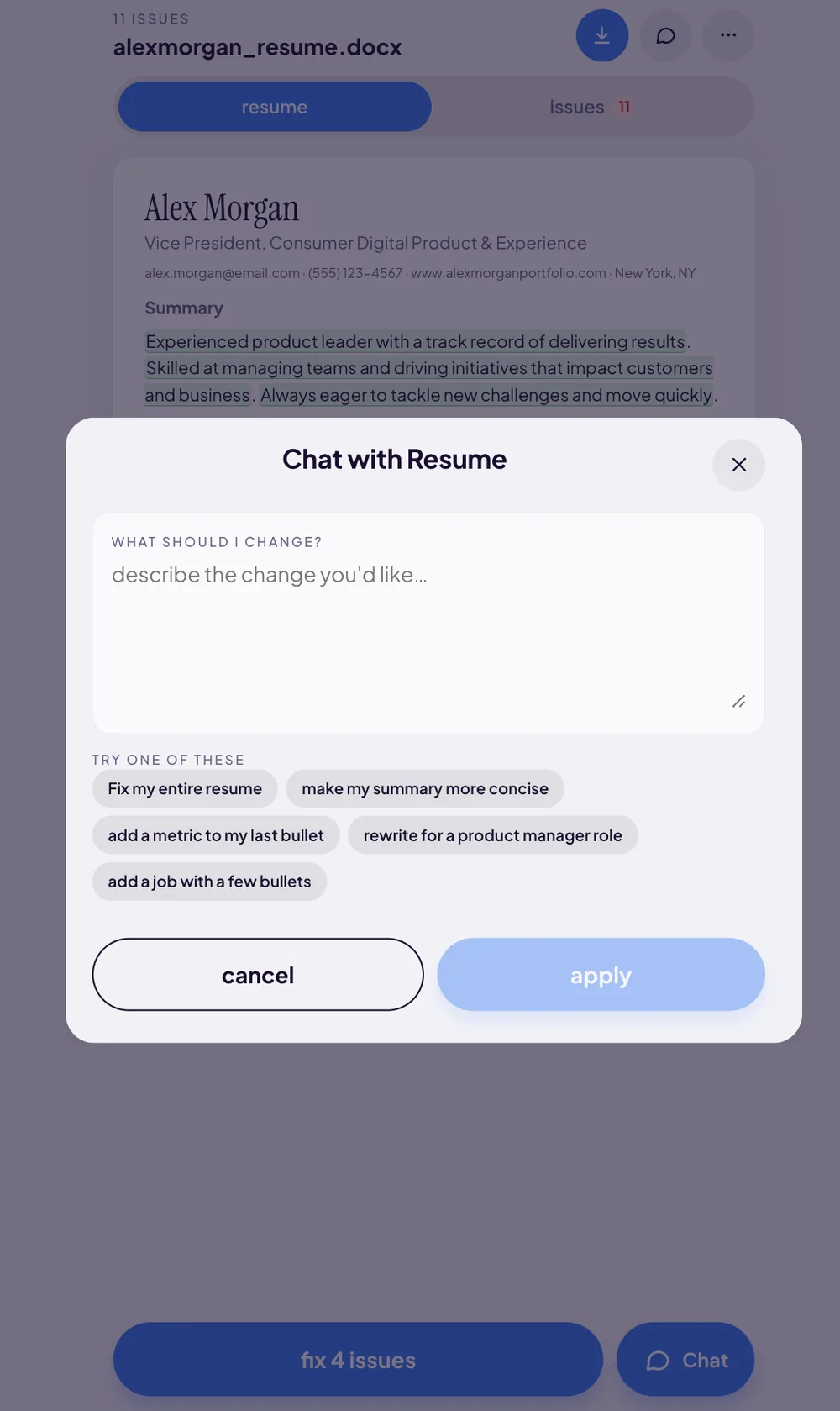
That's what the Chat button in the editor is for. It opens a sheet, you type what you want in ordinary English, and the app rewrites across the whole document. Nothing changes until you press apply.
Two ways to edit, and when to use each
The editor gives you two tools, and picking the wrong one is the difference between five minutes and forty.
The rewrite sheet is surgical. Every line the scan flags is highlighted in place — Alex Morgan's resume above carries 11 issues, with the buzzword-heavy summary in green and the weak bullets in orange. Tap any one of them and you get rewrite options for that line only. It's precise, it's fast, and it never touches anything you didn't ask it to. That's the flow we walk through in how to fix a weak resume bullet.
Chat is structural. It sees the whole document, so it can do things a single-line rewrite can't: change the tone across every bullet, re-aim the resume at a different job title, cut the length, add an entire role, or sweep every flagged issue in one pass.
The decision rule is simple:
- Use the rewrite sheet when the app has already flagged the exact line and you just want a better version of it.
- Use chat when the change spans the document — tone, target role, length, a whole new job — or when you want everything fixed at once.
The five suggestion chips, and what each is actually for
Under the prompt box, the sheet offers five starting points under TRY ONE OF THESE. They aren't decoration — each one maps to a real failure mode.
Fix my entire resume — the one-tap sweep. This is the button to press if you've just scanned, you're looking at 11 issues, and you don't want to think about any of them individually. It works through every flagged line — weak action verb, vague / buzzword, bullet length, missing metrics — and hands you a rewritten document to review. It's the fastest path from a bad score to a good one.
make my summary more concise — the summary is where buzzwords cluster. It's the one section people write last, in a hurry, in the voice of a LinkedIn post. Alex Morgan's original is a textbook case:
Results-driven professional with a proven track record of leveraging synergies to drive innovative solutions in fast-paced environments. Passionate about excellence and committed to delivering value to stakeholders across cross-functional teams.
Product manager with 8 years building B2B SaaS. Shipped a self-serve onboarding flow that cut time-to-first-value from 12 days to 3, and grew activation 22%.
Forty-one words of nothing became thirty-two words of evidence. Nothing about the career changed.
add a metric to my last bullet — the quantified-impact fix. Missing metrics is almost always the lowest bar in the breakdown, and it's the one recruiters feel most. Chat will ask for the number rather than invent one, and slot it in where it lands hardest.
Oversaw the customer support function and contributed to improvements in customer satisfaction.
Rebuilt the support triage process across a 12-person team, lifting CSAT 15% in two quarters.
rewrite for a product manager role — tailoring per application. More on this below, because it's the highest-ROI habit in job hunting and almost nobody does it.
add a job with a few bullets — describe the role in plain English ("I was a support lead at Northwind for two years, ran the escalation queue, hired four people") and the app writes structured bullets with a real verb and a real shape. You never fight formatting, and the new role comes out already matching the rest of the document.
How to write a prompt that actually works
The single biggest predictor of a good result is how specific your prompt is. Vague in, vague out. The pattern that works every time: name the section, name the change, name the fact.
- "make it better" → "rewrite my last two bullets to lead with a causal verb and include the 15% CSAT improvement"
- "shorten it" → "cut the summary to two sentences and drop any claim without a number"
- "add numbers" → "add team size to my Northwind bullets — I managed 12 people — and revenue to the last one, $1.4M ARR"
- "sound more senior" → "rewrite the experience section so every bullet leads with a decision I made, not a task I was assigned"
- "fix the buzzwords" → "remove 'results-driven', 'synergies' and 'passionate' from the summary and replace them with what I actually shipped"
Notice what the strong prompts all have in common: they supply a fact the app doesn't have. The model can restructure your writing, sharpen your verbs and tighten your lines on its own — but it cannot know that CSAT went up 15%, or that the team was twelve people, unless you tell it. Every number you hand it comes back embedded in the document. That's the whole trade.
Open the chat sheet on your own resume
Upload a PDF or DOCX, get your score and your flagged lines, then just describe what you want changed.
Try the AI resume editor free →Free score, free chat, free rewrites. No sign-up.
Tailoring the same resume to a different job
Here's the habit that pays more than any other: stop sending one resume to twenty postings.
A generic resume is written for nobody in particular, so it reads as written for nobody in particular. A targeted one puts the work that matters for this role in the first three bullets a recruiter's eye lands on. The reason people don't do it is that it used to mean twenty manual rewrites.
With chat it's one prompt. Paste the job title, and the language from the posting, into the box:
- "rewrite for a product manager role — emphasise roadmap ownership, cross-functional launches and pricing work, and de-emphasise the support tooling"
- "this posting is a platform PM role at a fintech. Lead with the API and infrastructure work, keep the compliance project, cut the marketing bullets to one line."
Same career, same facts, different emphasis. Do this once per application and you're spending two minutes to beat a stack of resumes whose owners spent zero.
Keeping it sounding like you
The fear is reasonable: you paste in your resume, hit a button, and get back something that reads like a press release from a company that doesn't exist. Three things keep that from happening.
Nothing is committed until you press apply. The sheet shows you the change first. cancel discards it entirely — your document is untouched. Read the rewrite the way a recruiter would: if a sentence contains a claim you wouldn't say out loud in an interview, cancel and re-prompt with the correction.
Chat only knows what you tell it. It doesn't invent numbers. If a bullet comes back with a metric, it's a metric you supplied — which is exactly why the specific prompts above outperform the vague ones.
You can steer the voice directly. "Keep my phrasing but fix the verbs" is a valid prompt. So is "plain language, no corporate adjectives, short sentences". If a pass comes back too polished, say so and run it again.
Re-scan and watch the score move
Chat edits count exactly the same as line-by-line fixes. Once you apply, re-scan: the flagged-issue count drops, the four breakdown bars move, and you get a new position on the curve. A Fix my entire resume sweep on Alex Morgan's 11 issues is the single biggest jump the app can produce in one tap — see how to read your aura score for what those bars are telling you, and resume issues explained for what each flag actually means.
The loop is: scan, chat, apply, re-scan. All of it is free, with no account. The only thing you ever pay for is the polished PDF or DOCX at the end — the Resume Aura Bundle, $9.99 one time — and only if you want it. Your resume itself is read once to do the work and then discarded. It is never stored.
Describe the change. See it happen.
Your resume is read once and never stored. Chat, suggestions and rewrites are free.
Chat with my resume free →